
Make your team AI-fluent Six weekly sessions tailored to your company's leadership team.
60 to 90 minutes each
Weekly, with practice in between
Designed for your company
From experiments to an operating plan, in six sessions We survey your team, learn your systems, and tailor every session so your leadership has a clear path to AI fluency.
How the training works Six weekly sessions, each one built on your real work, with support in between.
A short survey and a setup checklist
Each attendee fills out a short survey to help us shape your curriculum, and works through a checklist so their setup is ready on day one.
How AI works, on the tools you have chosen
We cover how AI works and the tools you have chosen, then walk through interactive exercises to start building your habits.
Built around your operation
Each session takes one idea and works it on a real example from your company. Everyone works their own problem on their own screen.
- A short assignment on real work
- The recording, transcript, and a recap
- Something to watch or read on your own
- A feedback form that shapes the next session
- Email us any time, or ask for a fifteen-minute call
By the sixth session, your leadership team has an AI setup they trust and use every day, the same vocabulary, a company AI handbook started, and an adoption plan they wrote and own.
Topics we cover Every one is practiced on something real from your company, and your team decides which ones we spend time on.
Work faster
The daily work, done in a fraction of the time and in your own voice.
- Writing and emailDrafts in your voice from a few spoken lines.
- Meetings and notesEvery meeting recorded, with notes and follow-ups.
- DictationTalk to it like a person.
- Documents and dataAsk questions of your own files and reports.
- SpreadsheetsSpreadsheets that do work rather than store it.
Think better
Clear briefs, real answers, and an AI that knows your company.
- Research and analysisA researched answer, with sources.
- Project managementProjects with files attached, one shared picture.
- PlanningAn initiative or a week planned with AI as the coach.
- Prompting wellGive it what a good employee would need to know.
- Managing contextYour company's background, written down.
Build safely
AI connected to your systems, with rules and a person on every approval.
- Connecting to toolsCalendar, mail, files, and systems, in your control.
- Building skillsA repeatable job written down once, run every time.
- AutomationsWork that runs on its own once the skill is set.
- Security and accessWhat AI may see, and what needs approval.
- Policy and guardrailsThe rules your company works by.
Your tools
The tools your company has chosen, taught on the real accounts your team will use.
- Claude, Cowork, and Claude Code
- ChatGPT, ChatGPT Work, and Codex
- Gemini, NotebookLM, and Antigravity
- Grok, Grok Build, Cursor, and GrokBot
- OpenClaw and other agent tools
The people who run the company
Owners, executives, and department heads who lead the teams and will set the direction for AI in your company.
Companies past the first experiments
Leadership has AI on their phone and knows it should be doing more. Employees use it on their own, with no shared rules or plan.
Anyone shopping for a demo
A company looking for a one-time show of what the software can do, or a team that wants the work done for them.
An adoption plan you own With your company AI handbook started.
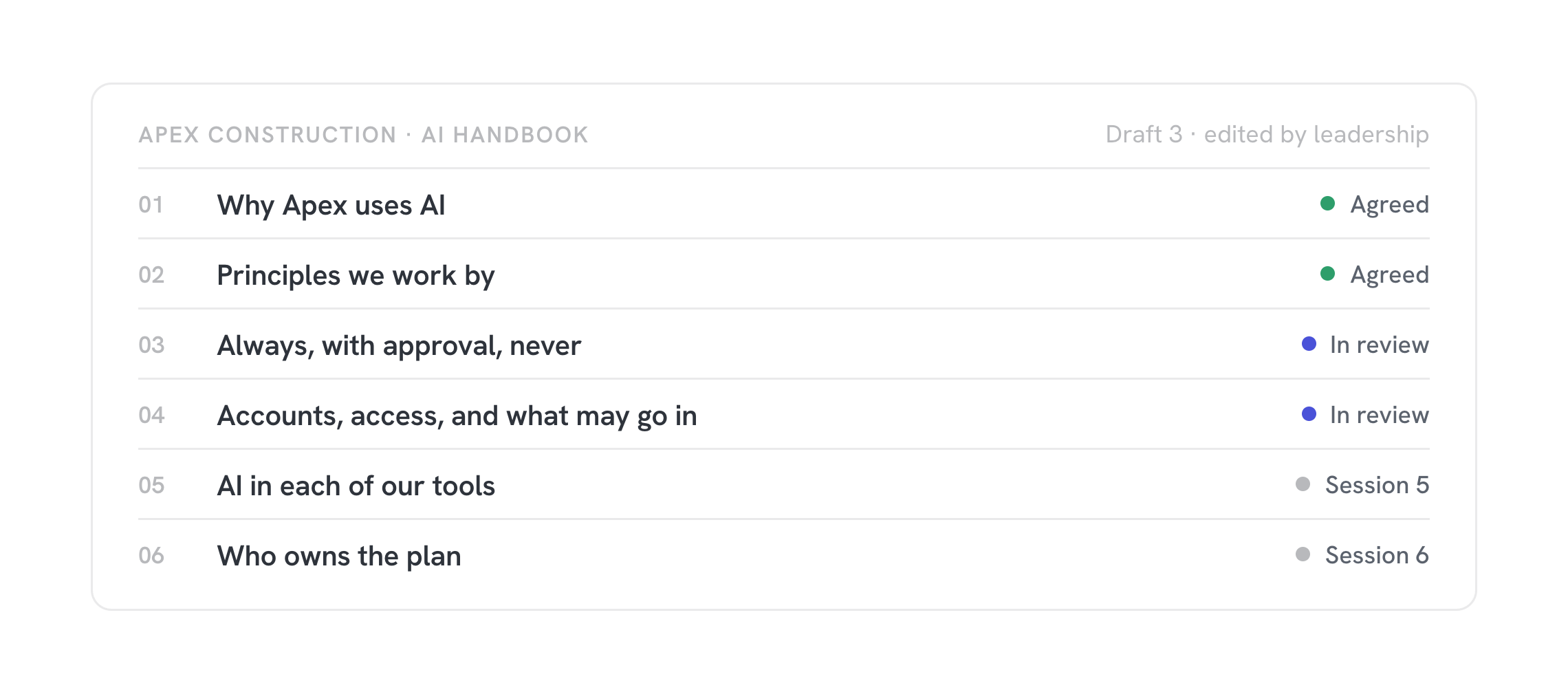
We bring a starting point for the handbook and build it out with you across the sessions. It sets your AI policy and principles: what is always fine, what needs approval, and what never happens.
After the training Leadership training is the start. Here is what most companies do next.
Start where the need is. Every engagement leaves you with a capability you did not have before.
Department training
Once leadership is trained, we train each department on its own work: its workflows, its tools, and its repeatable jobs. Field, office, and sales each get sessions built for that seat.
Operational mapping
We map how work actually flows through your operation, so you can see which steps to connect, which to hand to AI, and which to leave with people.
Learn moreAgent Base
We connect your company to Agent Base: your context, your workflows, your connections, and the automations we build for you, in one place.
Learn moreCustom software
When a mapped workflow needs more than a skill, we engineer custom software for it and host it in Agent Base.
Learn more